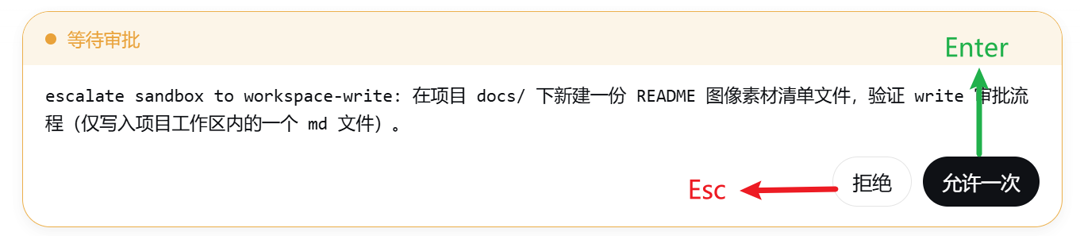
dsh-approval-hotkeys
Run the following command in DeepSeek Harness:
dsh plugin install SiriLee/dsh-approval-hotkeys
Paste the following prompt into your AI chat to install this plugin:
Run the installation command in DeepSeek Harness to install this plugin from the GitHub repository. Source: https://github.com/SiriLee/dsh-approval-hotkeys
About this plugin
When working with complex workflows in DeepSeek Harness, frequent interaction panels (such as approvals, questions, or plan reviews) often require tedious mouse clicks. This physical operation not only interrupts your flow but also reduces the efficiency of automated tasks. dsh-approval-hotkeys is designed to solve this pain point by bringing the classic IDE keyboard shortcut habits into the Harness interface.
As a minimal browser-side plugin, it offers universal compatibility, supporting all interaction panel types—whether for edit approvals, permission escalations, or tool questions. Its core logic is straightforward: pressing Enter automatically triggers the primary confirm button (usually "Allow" or "Submit"), while Esc triggers the cancel action. This design relies entirely on layout contracts, ensuring high stability without depending on unstable data attributes.
This plugin is ideal for developers and automation operators who prefer keyboard interactions. By restoring the Claude Code experience, it allows users to breeze through various popups without leaving their keyboard. The plugin includes smart anti-interference mechanisms that prevent accidental triggers while typing or using complex key combinations, providing a smooth interaction experience for workflow automation.
Screenshots
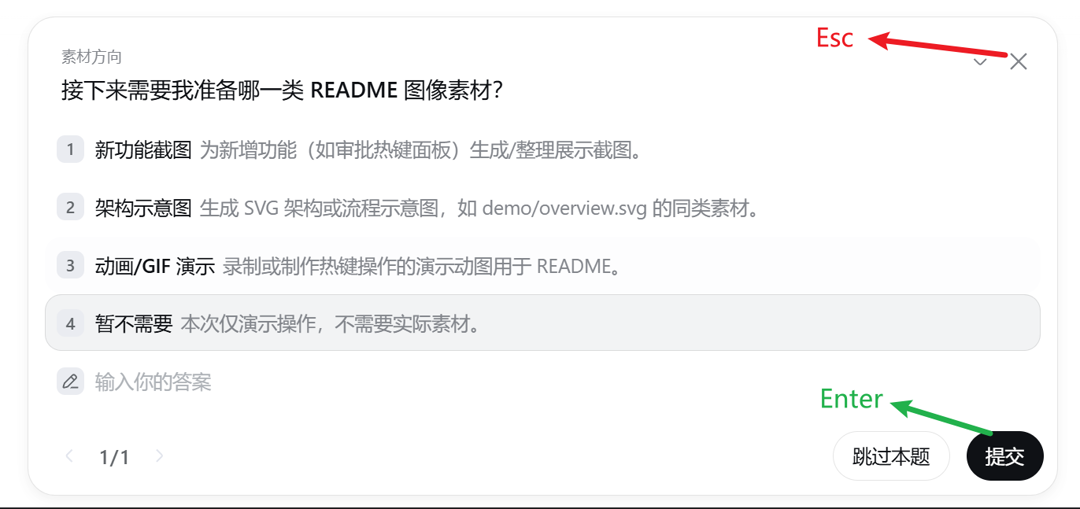
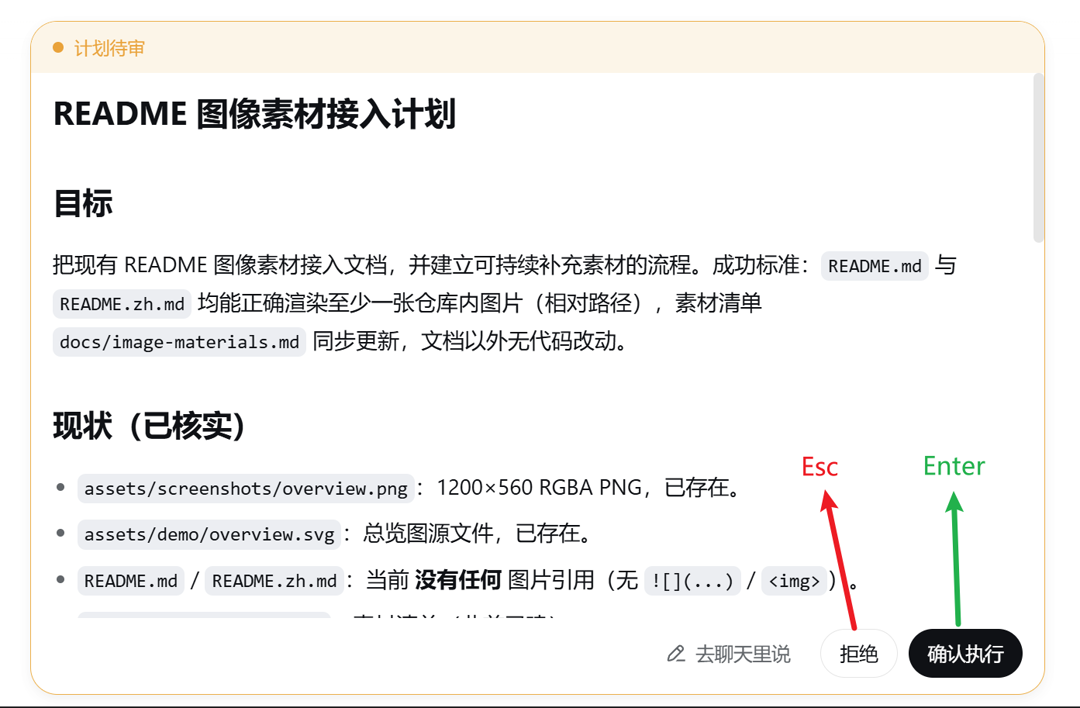
Use Cases
- Need to process a large volume of approval requests quickly
- Want to avoid frequent mouse clicks in tool question popups
- Wish to control all DeepSeek Harness interactions via keyboard
Best For
- Command-line users accustomed to keyboard operations
- Developers requiring highly automated workflows
- Operations personnel seeking to improve DeepSeek Harness efficiency
Related Plugins

A method pack that makes AI coding agents plan against your real baseline, prove completion with fresh evidence, and reduce reworks and unsafe changes.

Turns the DeepSeek Harness session into a captain that builds a durable sub-agent team, splits goals into dependency-aware tasks, and coordinates work via direct messages and a live Web UI.
Gives coding agents design judgment, letting Claude Code, Cursor, and 70+ agents generate and iterate high-quality UI, presentations, and graphics right from the terminal.
Run the Pi ecosystem's plugins on DeepSeek Harness, unmodified, via a compatibility layer that implements Pi's public extension ABI on DSH's native services.