deepseek-harness-ssh
Run the following command in DeepSeek Harness:
dsh plugin install gdgfd22/deepseek-harness-ssh
Paste the following prompt into your AI chat to install this plugin:
To install this plugin in DeepSeek Harness, execute the command: dsh plugin install gdgfd22/deepseek-harness-ssh (Source: https://github.com/gdgfd22/deepseek-harness-ssh).
About this plugin
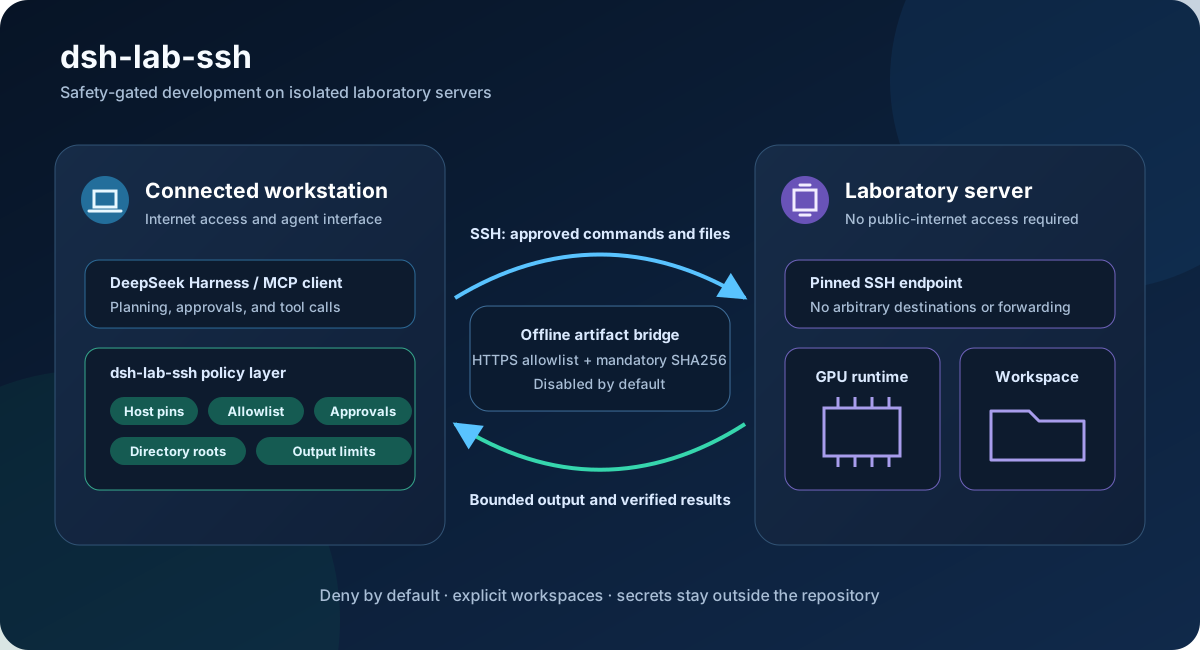
When AI agents need access to isolated laboratory GPU servers, traditional SSH terminals can be dangerously permissive, exposing arbitrary commands and file paths. deepseek-harness-ssh addresses this critical security gap by providing a safety-gated SSH development toolkit for DeepSeek Harness and standard MCP clients. By implementing a strict "deny-by-default" policy, the plugin ensures that agents can only interact with pre-configured fixed host aliases, protected filesystem paths, and command allowlists, maintaining operational safety while preserving server isolation.
The plugin offers robust core capabilities, including fixed SHA256 host-key fingerprint verification, alias-based remote directory root constraints, atomic file writes with hash protection, and command execution timeouts. It also features an HTTPS artifact bridge specifically designed for offline servers, enabling secure artifact staging and validation without exposing the infrastructure to the public internet. As of version 0.3.0, the DeepSeek Harness plugin, stdio MCP server, and command policy are fully implemented, backed by a test suite of 25 tests to guarantee isolation from real infrastructure.
This solution is ideal for developers, researchers, and DevOps professionals who need to run AI models in a secure sandbox. If you require access to laboratory computing resources but must strictly prevent unauthorized modifications or access, this tool provides granular control, ensuring your server remains completely isolated from the public web.
Screenshots
Use Cases
- Running AI models on isolated lab servers
- Safely transferring and verifying offline artifacts
- Limiting agents to execute predefined commands
Best For
- Developers needing secure sandboxes
- AI researchers utilizing GPU resources
- DevOps engineers managing MCP server connections
Related Plugins

Adds an Auto approval mode on the official workspace-write sandbox, classifying semantic risks, asking when ambiguous, and denying destructive operations.

Undo/rollback system for DSH: config & plugin snapshots, one-click undo/redo/restore, message-level revert, secret masking, safe mode, and offline WebUI/GUI/CLI rescue tools for when DSH won't start.
Packages all 87 SKILL.md files from upstream reverse-skill as a DeepSeek Harness plugin that auto-registers them for authorized reverse engineering, penetration testing, and security research.
Dockyard DSH is a native DeepSeek Harness plugin that unifies official OAuth/client sessions for Codex, Antigravity, Grok, Claude, and Cursor, providing account pool, model catalog, and quota status.