deepseek-harness-matt-plugin
Run the following command in DeepSeek Harness:
dsh plugin install sa998aaron/deepseek-harness-matt-plugin
Paste the following prompt into your AI chat to install this plugin:
To install this plugin in DeepSeek Harness, run `dsh plugin install sa998aaron/deepseek-harness-matt-plugin`. The source code is located at https://github.com/sa998aaron/deepseek-harness-matt-plugin.
About this plugin
Building complex AI agent workflows often lacks the necessary system coherence, making it difficult to manage complex tasks efficiently. The deepseek-harness-matt-plugin is designed to solve this by transforming fragmented AI interactions into a structured, visual development pipeline.
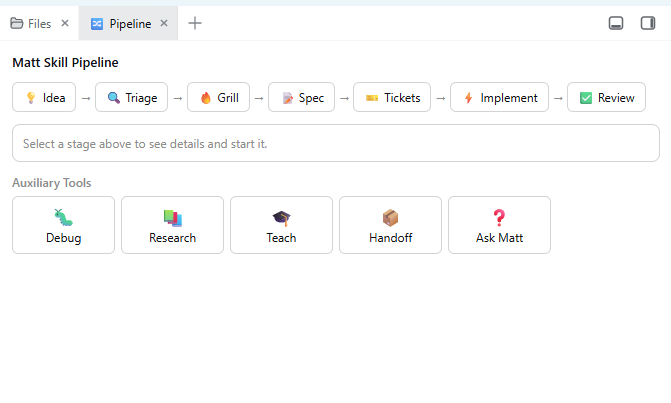
The plugin deeply integrates Matt Pocock's classic skill set, packaging them into callable DeepSeek Harness (DSH) skills. Its core strength lies in the 🔀 Pipeline visual panel, which standardizes the software development process into a complete loop: "Idea → Triage → Grill → Spec → Tickets → Implement → Code Review." Users can trigger skills directly via the panel or use bottom auxiliary tools (Debug, Research, Handoff) to enhance interaction at any time.
This plugin is ideal for developers, technical leads, and teams seeking a highly structured workflow. Whether you are engaging in agile development, bug diagnosis, or feature planning, it provides comprehensive support from macro-process control to micro-skill execution, empowering the AI assistant to act as your true engineering partner.
Screenshots
Use Cases
- Translating requirements to code
- Automated code review
- Complex task triage
Best For
- Software developers
- AI agent architects
- Agile development teams
Related Plugins

A method pack that makes AI coding agents plan against your real baseline, prove completion with fresh evidence, and reduce reworks and unsafe changes.

Turns the DeepSeek Harness session into a captain that builds a durable sub-agent team, splits goals into dependency-aware tasks, and coordinates work via direct messages and a live Web UI.
Gives coding agents design judgment, letting Claude Code, Cursor, and 70+ agents generate and iterate high-quality UI, presentations, and graphics right from the terminal.
Run the Pi ecosystem's plugins on DeepSeek Harness, unmodified, via a compatibility layer that implements Pi's public extension ABI on DSH's native services.