
dsh-course-writer
Run the following command in DeepSeek Harness:
dsh plugin install bettermen/dsh-course-writer
Paste the following prompt into your AI chat to install this plugin:
In DeepSeek Harness, install via command `dsh plugin install bettermen/dsh-course-writer`, or download the latest version from the GitHub URL: https://github.com/bettermen/dsh-course-writer.
About this plugin
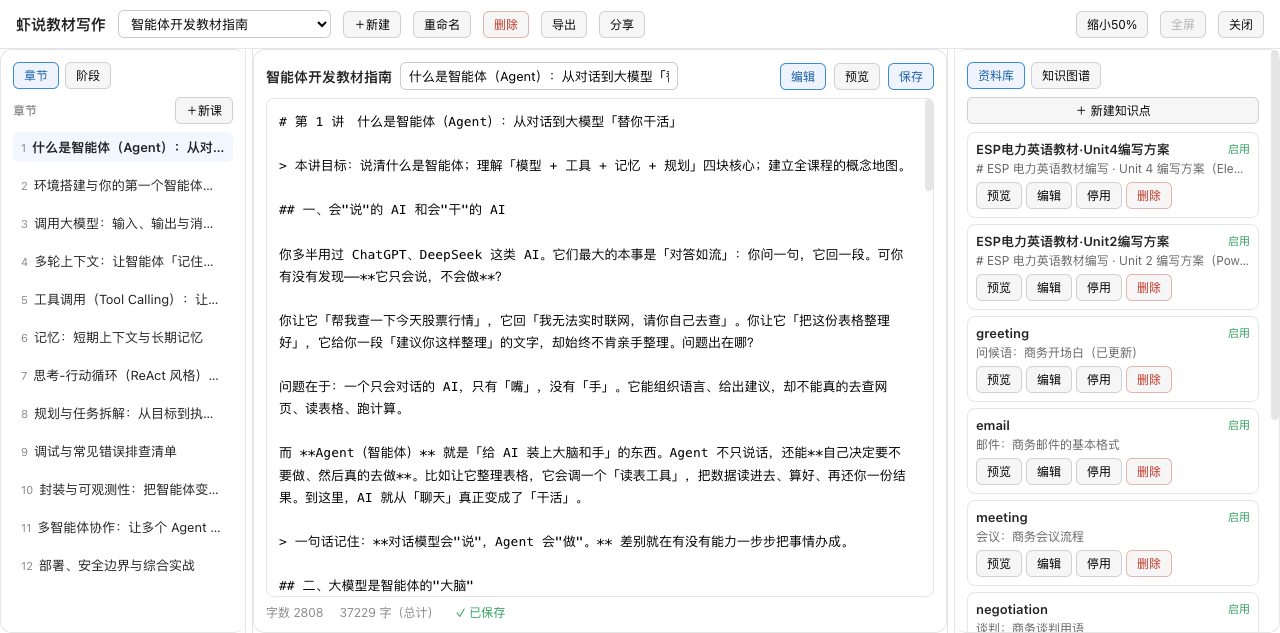
Course writing is a complex and systematic endeavor, often involving multiple stages and the organization of numerous knowledge points. Traditional methods lack structural support, leading to disorganized workflows and fragmented content. This plugin addresses these challenges head-on: it offers a three-pane workspace that integrates chapter lists, a Markdown editor, and a lorebook for intuitive content management. The nine-phase gated workflow guides authors from topic selection and learning analysis to final assessment, ensuring each step is solid and reliable—preventing premature progression that could compromise quality.
Beyond process control, the plugin excels in building and consolidating knowledge systems. The lorebook enables the creation, editing, and management of knowledge points, while the knowledge graph visually maps their interconnections, helping authors maintain a clear overview of the content structure. Export capabilities to TXT and Word formats facilitate standard document delivery, and sharing features generate links for collaborative editing with automatic conflict detection, significantly boosting team productivity. Together, these features position AI as a professional course-authoring partner, not just a writing tool.
Whether you're an independent educator, a corporate trainer, or part of a team compiling educational materials, this plugin offers robust support. It's ideal for anyone seeking efficient, structured course creation, especially in scenarios that demand rigorous pedagogical processes. By blending AI capabilities with a user-friendly interface, it transforms intricate course writing into an orderly, controllable, and reproducible experience.
Screenshots
Use Cases
- Systematically create a new course from scratch.
- Organize existing outlines or knowledge points into a structured framework.
- Collaboratively author courses with real-time editing and version control.
Best For
- Educators and trainers who need to create teaching materials efficiently.
- Course authors and content creators seeking structured writing workflows.
- Team-based projects, such as academic groups or corporate training departments.
Related Plugins

A method pack that makes AI coding agents plan against your real baseline, prove completion with fresh evidence, and reduce reworks and unsafe changes.

Turns the DeepSeek Harness session into a captain that builds a durable sub-agent team, splits goals into dependency-aware tasks, and coordinates work via direct messages and a live Web UI.
Gives coding agents design judgment, letting Claude Code, Cursor, and 70+ agents generate and iterate high-quality UI, presentations, and graphics right from the terminal.
Run the Pi ecosystem's plugins on DeepSeek Harness, unmodified, via a compatibility layer that implements Pi's public extension ABI on DSH's native services.