dsh-preset-switch
Run the following command in DeepSeek Harness:
dsh plugin install aorucshiea/dsh-preset-switch
Paste the following prompt into your AI chat to install this plugin:
In DeepSeek Harness, install this plugin by running the command 'dsh plugin install aorucshiea/dsh-preset-switch' or visit the full source URL at https://github.com/aorucshiea/dsh-preset-switch for more details.
About this plugin
When using DeepSeek Harness agents for multi-turn interactions, the official setup typically locks presets in new sessions to avoid mismatched tool calls. However, for users who need flexible agent behavior, this lock can disrupt workflow continuity. The dsh-preset-switch plugin addresses this by allowing live preset switching within a running session, eliminating the need to restart sessions and adapting to different task requirements on the fly.
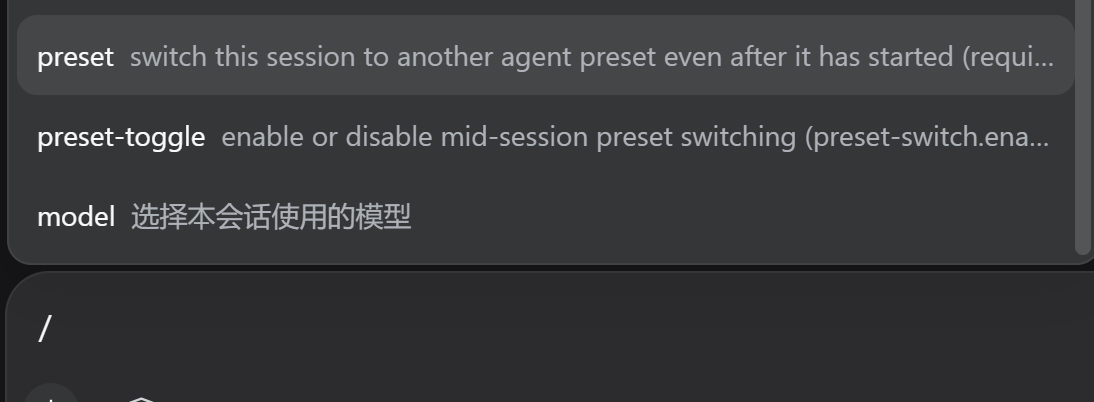
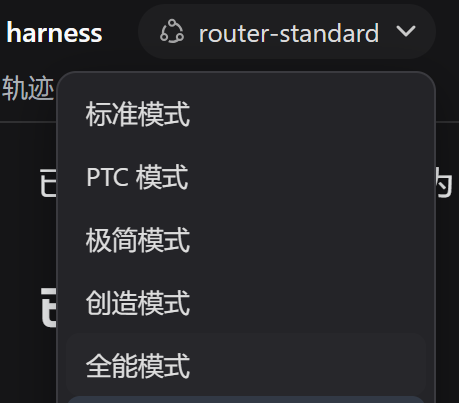
The plugin's core capabilities revolve around convenient switching mechanisms. Users can switch presets via the /preset command, which accepts preset names or numbers as a keyboard fallback. In browser environments, it integrates a searchable Web popup picker for intuitive selection from a list. Additionally, it offers the /preset-toggle command to enable or disable the feature and provides an HTTP endpoint for integration with custom UIs or other tools. Notably, the plugin bypasses the official empty-session lock and displays a warning during switching, alerting users to potential mismatches and ensuring safe usage.
This plugin is ideal for users who handle multiple tasks within a single session or frequently adjust agent configurations. For instance, developers switching between code debugging, documentation generation, and analysis; or researchers selecting different presets based on experimental stages. It streamlines workflows by eliminating the hassle of frequent new sessions, boosting efficiency. For individuals or teams seeking to customize and optimize their DeepSeek Harness experience, dsh-preset-switch offers a flexible and reliable solution.
Screenshots
Use Cases
- Switching agent presets live within a running session to adapt to different tasks.
- Quickly selecting presets via a web popup menu without manual typing.
- Using command-line commands for keyboard shortcuts to boost efficiency.
Best For
- Developers who need flexible adjustment of agent behavior.
- Researchers frequently switching presets between different tasks.
- Users seeking to optimize workflows and integrate custom UIs.
Related Plugins

A method pack that makes AI coding agents plan against your real baseline, prove completion with fresh evidence, and reduce reworks and unsafe changes.

Turns the DeepSeek Harness session into a captain that builds a durable sub-agent team, splits goals into dependency-aware tasks, and coordinates work via direct messages and a live Web UI.
Gives coding agents design judgment, letting Claude Code, Cursor, and 70+ agents generate and iterate high-quality UI, presentations, and graphics right from the terminal.
Run the Pi ecosystem's plugins on DeepSeek Harness, unmodified, via a compatibility layer that implements Pi's public extension ABI on DSH's native services.