dsh-plugin-visual-composer
Run the following command in DeepSeek Harness:
dsh plugin install VanillaCreamer/dsh-plugin-visual-composer
Paste the following prompt into your AI chat to install this plugin:
To install this plugin in DeepSeek Harness, run the command: dsh plugin install VanillaCreamer/dsh-plugin-visual-composer or visit the open-source address at https://github.com/VanillaCreamer/dsh-plugin-visual-composer
About this plugin
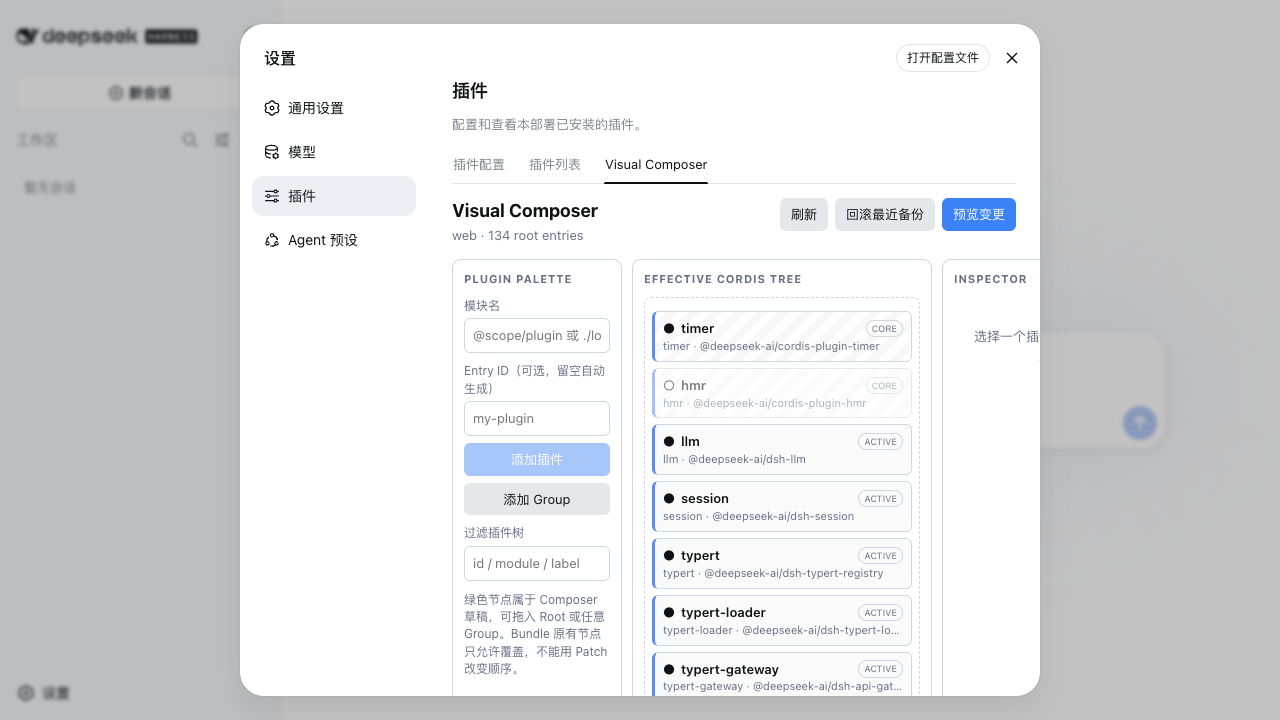
DeepSeek Harness employs a flexible Cordis plugin architecture, but managing intricate plugin trees often involves manual YAML edits, dealing with nested Groups, state monitoring, and configuration overrides, which can be tedious and error-prone for users. DSH Visual Composer addresses this by transforming the plugin tree into an intuitive visual canvas, allowing users to view plugin statuses in real-time, effortlessly add new plugins or Groups, adjust layouts via drag-and-drop, and edit configurations directly within the interface. The plugin also offers features like previewing YAML changes, secure saving, and one-click rollback, ensuring all modifications are controlled and traceable. It is ideal for DeepSeek Harness developers, operations personnel, or anyone seeking to simplify plugin management, making complex configuration tasks efficient and reliable.
Screenshots
Use Cases
- Managing complex plugin tree structures in DeepSeek Harness
- Visually editing plugin configurations and statuses
- Previewing changes and safely rolling back configurations
Best For
- DeepSeek Harness developers and operations personnel
- Users needing fine-grained plugin configuration management
- Technicians who prefer graphical interface operations
Related Plugins

A method pack that makes AI coding agents plan against your real baseline, prove completion with fresh evidence, and reduce reworks and unsafe changes.

Turns the DeepSeek Harness session into a captain that builds a durable sub-agent team, splits goals into dependency-aware tasks, and coordinates work via direct messages and a live Web UI.
Gives coding agents design judgment, letting Claude Code, Cursor, and 70+ agents generate and iterate high-quality UI, presentations, and graphics right from the terminal.
Run the Pi ecosystem's plugins on DeepSeek Harness, unmodified, via a compatibility layer that implements Pi's public extension ABI on DSH's native services.