Preface
When writing prompts in the web chat interface of DeepSeek Harness (dsh), drafts often start out as messy: colloquial, repetitive, mixed with Chinese and English, and structurally scattered. Sending them directly works, but the model has to guess your key points first; revising the draft yourself will also interrupt your train of thought.
DeepSeek officially summarized the core philosophy of Harness as “Everything is a plugin”: models, tools, sessions, and UI can be added or removed at the configuration layer without modifying the core source code. As a result, a batch of interface plugins that focus on one small task have emerged in the community. dsh-composer-polish targets the input box: after finishing your draft, click the ✨ button in the toolbar, and the polished result will be filled back into the input box after a few seconds. You can preview, revise, and then decide whether to send it.
This article is collated after cross-checking the community plugin directory, the GitHub repository README, package.json, and the source code. This directory is an independent website and has no official affiliation with DeepSeek or HyperFount. It should not be treated as an official app store. Harness is currently in developer preview, and plugins may have incompatible changes as the core updates.
What is this
dsh-composer-polish is a UI enhancement plugin for the DeepSeek Harness Web UI, maintained by GitHub user tianji-qingtian, with the MIT license. The current version number is v0.1.3, as shown in both package.json and the git tag. As of 2026-08-17, the GitHub API shows 6 stars for this repository; the community directory page lists 12 stars for the same period, so the GitHub first-hand data will be used below.
It solves a very narrow problem: rewrite the text draft in the current input box to be clearer and better organized, then fill it back into the input box. The repository README positions it as: “No evaluation, no scoring: draft in, better draft out”. It will not send the message for you, nor will it touch image attachments.
The dsh.client.platform field in package.json is declared as web. If you install this plugin on a terminal TUI or headless configuration without a UI, you will not see this button.
Core Features
The behavior described in the repository README, the requirements document REQUIREMENTS.md, and the src/ source code are consistent, and can be understood through the following points.
The ✨ Button in the Toolbar
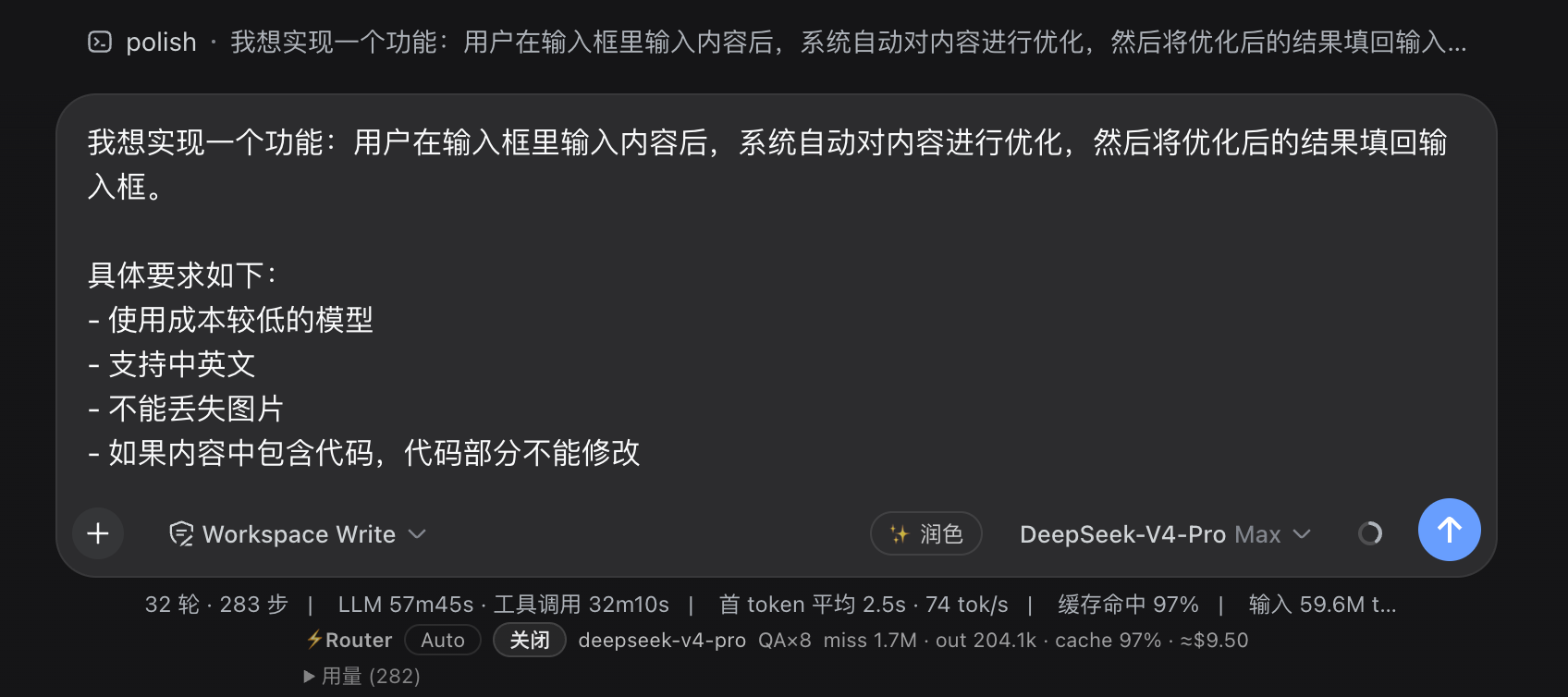
The client attaches the button to the official slot conversation.input.right, right next to the send button. The text follows Harness’s locale service: “Polish” in Chinese, and “Polish” in English. The button is disabled when the draft is empty or only contains whitespace; while polishing is in progress, it will spin and block repeated clicks.
The repository provides a screenshot of the button’s position:
Rewrite with the Flash Model, Do Not Touch the Main Conversation Prefix
The host registers the slash command /polish. After clicking the button, the browser sends the current draft through Harness’s built-in commands remote, which uses the same channel as the built-in / commands, without creating a separate RPC.
The rewrite is a zero-prefix ctx.llm.stream call: the provider is fixed as deepseek-official, the model is fixed as deepseek-v4-flash, reasoningEffort is set to 'off', and maxTokens is 2000. The model used in the main session will not run another round, and the prefix cache will not be occupied by this polish. If this model ID cannot be found in the directory, the host will retry with a flash-class model selected via llm.listModels.
Fill Back to the Input Box, Do Not Send the Message
After the polish is successful, the client takes the text from the command result and calls the official write path inputActions.setDraft to replace the content of the input box. You can continue editing, or click the ✨ button again; if you do not click send, nothing will enter the conversation. If the draft contains images, only the text will be replaced, and the images will remain unchanged and not lost.
The current draftRev is recorded when clicking. If you edit the draft again before the polish result returns, the result will be discarded to avoid overwriting your newly typed text.
Fail Silently, Do Not Log the Original Text to the Conversation Log
If the rewrite fails, returns empty, or the command reports an error, the original text in the input box will remain unchanged, and only a log will be printed in the browser console, without a toast pop-up.
/polish is registered with recordInput: false, and the command/run event does not write args, so the original draft will not end up in the conversation log. It should be noted that the polish result will still be recorded in command/done. This plugin cannot completely erase all traces of the rewrite.
Language, Tone, and Code Preservation Strategy
The prompt is written in the host’s source code src/index.js, requiring the rewrite to:
- Follow the language of the draft (if mixed with Chinese and English, follow the dominant language)
- Retain intent, facts, and constraints without adding or removing content
- Preserve code blocks, file paths, command lines, error messages, identifiers, and technical terms as-is
- Remove colloquialisms and repetitions, but do not make the text more formal, marketing-oriented, or robotic
- Make minimal changes to drafts that are already clearly written
- Only return the polished main text, without prefaces, explanations, or outer quotation marks
The current version does not support “specify style for rewrite”. The requirements document clearly states: v1 only performs general polishing.
Installation and Activation
The installation command given on the community directory page is as follows, run it in the DeepSeek Harness terminal:
dsh plugin add github:tianji-qingtian/dsh-composer-polish
The directory page also notes that for a reproducible installation, you should pin the commit hash, in the format dsh plugin add github:tianji-qingtian/dsh-composer-polish#commit.
The steps in the repository README are more complete and are actually more reliable. It requires adding the plugin to the web profile and pinning it to the released tag v0.1.3. The repository has submitted the built lib/ folder, so no build script will be run during installation.
First confirm that dsh is in your PATH. If you usually only start Harness with npx @deepseek-ai/dsh web, you may not have the global CLI installed, and you will get a command not found: dsh error. The installation method given in the README is:
npm install -g @deepseek-ai/dsh
You can also use pnpm add -g @deepseek-ai/dsh (the global bin directory needs to be in your PATH), or skip the global installation and prefix subsequent commands with npx @deepseek-ai/dsh.
Then add the plugin to the web profile and restart:
dsh plugin --profile web add "github:tianji-qingtian/dsh-composer-polish#v0.1.3"
dsh --profile web
The add command only modifies the profile file, and the running instance will not hot-reload. After restarting, the ✨ button should appear in the input box toolbar next to the send button; the /polish command will only be registered after the host has fully loaded. You can confirm that dsh-composer-polish is in the plugin list in Settings → Plugins.
The Node engine declared in package.json is ^22.19.0 || >=24.0.0. If your environment is too different, first check your local Node version.
Typical Usage
Following the acceptance paths in the README and requirements document, the daily usage is three steps:
1. Write your draft in the Web UI input box. The button is grayed out and unclickable when the draft is empty or only contains whitespace.
2. Click ✨ Polish / Polish in the toolbar. The button enters a loading state, which takes about a few seconds.
3. The text in the input box is replaced with the rewritten result. Preview it, click again if you are not satisfied, or edit it yourself before sending.
This also applies when asking questions with images: only the text will be processed. Chinese drafts will be rewritten in Chinese, and English drafts will be rewritten in English. Drafts containing code blocks, lists, and paths should retain their structure, and the code itself should not be “optimized” away.
The repository does not provide copy-pasteable before-and-after examples, and this article will not fabricate polish effects. Testing with your own real drafts is the most accurate way.
Applicable Scenarios and Notes
It is most suitable for these situations: prompts that you dictated first and then organized, scattered requirement descriptions, mixed Chinese and English, or the same sentence repeated twice. It is not suitable as a general writing assistant—it does not provide tone levels, and does not guarantee rewrite quality; the upper limit is about 2000 tokens, and drafts over 50 KB will be truncated on the client before being sent (the host side also has a cap). Ultra-long technical documents and external drafts that require a specific writing style are beyond its design scope.
Before using, please note these points, all from the directory page or the repository’s original text, not inferred:
- Permissions: The plugin runs with the permissions of the current dsh process, and may execute code during installation. You should review the source code and license before installing.
- Platform: Only the Web client is declared; do not expect it to appear in the TUI.
- Model: The rewrite depends on deepseek-v4-flash under deepseek-official (or a one-time fallback to a flash-class model). If this provider is unavailable, or all flash models cannot be called, after the button finishes spinning, the draft will not change, and you can only check the console for logs.
- Compatibility: The README clearly states that Harness is in developer preview, with fast iterations, and incompatible changes may occur.
- Privacy Boundary: The original text does not appear in the args of command/run, but the rewrite result will be included in command/done.
- Anti-overwrite: Continue editing during the polish, and the fill-back will be skipped. This is an intentional design, not a bug.
Summary
dsh-composer-polish turns “polish your draft before sending it to the model” into a button next to the input box: rewrite with the flash model, fill back the result, and leave the main conversation prefix unchanged. Its capability boundaries are also clear: Web UI only, general polishing, fail silently, 50 KB cap.
Community Directory: https://deepseek-harness-plugin.com/zh-CN/plugins/dsh-composer-polish/
GitHub: https://github.com/tianji-qingtian/dsh-composer-polish